Working with Manjaro KDE Linux
Table of Contents
Guide for say Goodbye to Windows Preparation of a USB media. When it comes with a dialog box for choosing writing mode, choose as: Restart your PC and press Start Installation. Choose correct partition table type( After installation, reboot and try mount Some users may notice that The warning means the partition start is not aligned. Anyway, What you should do is to remove all partitions on the disk then run the command like So you can try Run To configure auto-starting services with Use the command like Finally, reload the If you have /home directory on KDE platform before, you may run To make programs (Yakuake, etc.) autostart: Alt + F2 -> autostart -> Add Program… For some Chinese users, generating mirror list may raise an error (probably caused by network), you can use Then, for all Chinese users, it is better to add archlinuxcn mirror for pacman. Enter You should put it bebind the main repos (for example, core) to prevent conflicts. Then: Finally, use aurman for enhanced package manager: DO NOT use yaourt any more nowadays. It’s out of date. To upgrage the whole system, you should run Then you can run For some Chinese users, Install dnsutils first, then check DNS address. Edit Use By typing If you want add a sudoer who never need password to run commands as root, you can set as: You should only use one space as separator in this section (perhaps in the whole file) for correctly recognized. To make TeamViewer work properly under Fedora 25 with Gnome 3: Sometimes TeamViewer cannot connect to server after Arch Linux system upgraded, you should restart then have another try. Use gcc-fortran instead of gfortran (may cause conflicts when system upgrade). To speed up It’s For RStudio server release, run Steam outputs this error and exits. For steam to work, disable dri3 in xorg config file or as a workaround run steam with Sometimes when the toolbox started after a system upgrade, the application consumes a lot CPU and displays a empty window. To solve this problem, add starting option See Arch Wiki here.OS Installation
sudo fdisk -l.sudo dd if=~/Downloads/manjaro-kde-17.0.1-stable-x86_64.iso of=/dev/sdc (You may replace the ISO file name and target device name by yourself). This will take even over 10 minutes. For Windows user, it is highly recommended to use Rufus, which can automatically process with more than one partition. Set the options as: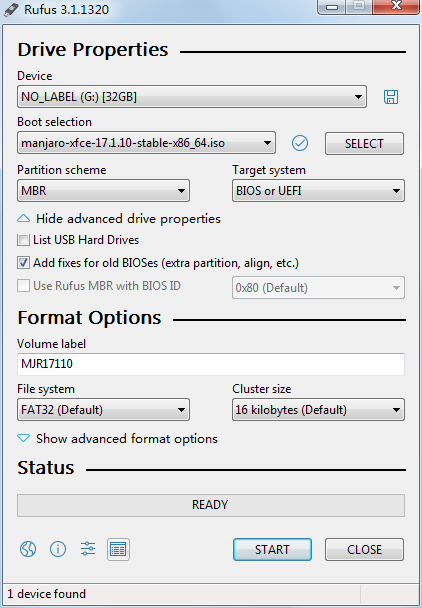
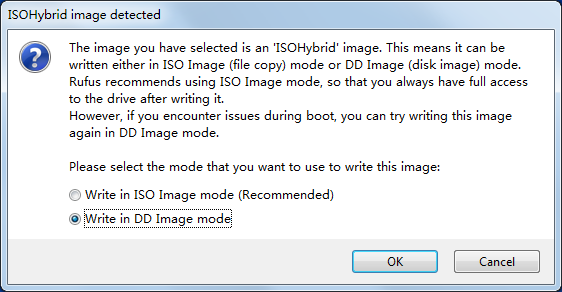
F12 to choose boot from USB flash driver.GPT for UEFI supported motherboard, with manually choose UEFI boot later. MBR for others). You never need set a mount point of /home at this step, for it should be mounted with another hard disk who will storage data. Volume of these partitions should be set as below:Directories Volume File system /boot 512M 1 ext4 swap 2048M 2 Linux-swap / remaining space 3 ext4 /home.sudo fdisk -l to check all mountable devices./dev/sdb (for example). If its volume less than 2TB, you can simply use fdisk to make partition table for it. Else, you may use another advanced tool like parted. Run parted /dev/sdb to start, you will get a (parted) prompt. Here we want to create only one partition, whose type is primary with ext4 file system, just type mkpart primary ext4 0% 100%.print can be used to show information of current device, then they may use mkpart primary ext4 0 8TB (for example) to build partition table, which sometimes raise a warning message:Warning: The resulting partition is not properly aligned for best performance.
Ignore/Cancel?0KB is not real start of your disk../parted_mkpart_calc.sh sdb (the shell script can be obtained here), then you will see imformations like:Using default 1 MiB default alignment in calc
Calculated alignment for /dev/sdb (gpt) is: 2048s
If you would be root, you could create partition with:
# parted /dev/sdb mkpart [name] [type] 2048s 15624996863s
Verify partition alignment with:
# parted /dev/sdb align-check optimal 1
Should return: 1 alignedparted /dev/sdb mkpart primary ext4 2048s 15624996863s and finally run parted /dev/sdb align-check optimal 1 for checking.mkfs.ext4 -F /dev/sdb1 to reformat partition (parted’s ext4 parameter doesn’t works, I don’t know why yet).mount /dev/sdb1 /home to mount new disk as /home. To make this mount point auto-mounted, add /dev/sdb1 /home ext4 defaults,noatime 0 2 at the last line of /etc/fstab, then restart.systemd (use the sshd.service as example, you may also add teamviewerd and rstudio-server.service for auto-start them):sudo systemctl enable sshd.service to enable the service, and this should create a symlink in /etc/systemd/system/multi-user.target.wants/ that looks like the following (do NOT create this manually):lrwxrwxrwx 1 root root 38 Aug 1 04:43 /etc/systemd/system/multi-user.target.wants/service.service -> /usr/lib/systemd/system/service.servicevim /etc/systemd/system/multi-user.target.wants/sshd.service to check the content of the service file. Make sure the file contains a line like Restart=always under the [Service] section of the file to enable the service to respawn after a crash.systemd daemon, followed by a restart of the service:sudo systemctl daemon-reload
sudo systemctl restart sshd.servicecd; rm -rf .cache .config .kde4 .local to reset your KDE environment.Autostart
R!E!P!O!
# Testing and optimizing mirrors
sudo pacman-mirrors -g
sudo pacman-optimize && sync
# Updating OS
sudo pacman -Syyusudo pacman-mirrors -g -c china instead.sudo nano /etc/pacman.conf then:[archlinuxcn]
SigLevel = Optional TrustedOnly
Server = https://mirrors.ustc.edu.cn/archlinuxcn/$archsudo pacman -Syyu
sudo pacman -S archlinuxcn-keyringsudo pacman -S aurmanaurman -Syu weekly. If there’s message like this:~~ the following packages are neither in known repos nor in the aur
:: pcmciautils-018-8pacman -Rns $(pacman -Qtdq) to remove all unused packages.aurman may raise connection error, you can edit ~/.config/aurman/aurman_config to set longer timeout for it.[miscellaneous]
aur_timeout=100Change default DNS server
sudo pacman -S dnsutils
dig www.baidu.com/etc/resolv.conf to change DNS server by adding these lines:# Google nameservers
nameserver 8.8.8.8
nameserver 8.8.4.4sudo chattr +i /etc/resolv.conf to set write-protection for this file (generally it will be reset during reboot).Set users as sudoers
sudo visudo, you can change sudoers in vi mode, then use /root with n (perhaps more than one time) to change the position of cursor to the User privilege specification section. Press yyp to copy & paste the current line, then dft to delete username ‘root’, finally add the new sudoer’s username. Press :wq to save and exit. Now this section of configuration file seems like:##
## User privilege specification
##
root ALL=(ALL) ALL
ysun ALL=(ALL) ALLysun ALL=(ALL) NOPASSWD:ALLInstall and Configure softwares
VIM
sudo pacman -S vimTeamViewer
sudo pacman -S teamviewer/etc/gdm/custom.conf.WaylandEnable=false.gcc-fortran
sudo pacman -S gcc-fortranlocate
sudo pacman -S mlocate
# Make cache before you first use it
sudo updatedb
Aria2
sudo pacman -S aria2aurman:makepkg but not aurman downloading the packages, so change the content of /etc/makepkg.conf to use aria2 instead of curl:DLAGENTS=('ftp::/usr/bin/aria2c %u -o %o'
'http::/usr/bin/aria2c %u -o %o'
'https::/usr/bin/aria2c %u -o %o'
'rsync::/usr/bin/rsync --no-motd -z %u %o'
'scp::/usr/bin/scp -C %u %o')R && RStudio
sudo pacman -S microsoft-r-openaurman -S rstudio-desktop-binsudo yaourt -S rstudio-server-bin instead.Steam
symbol lookup error: /usr/lib/libxcb-dri3.so.0: undefined symbol: xcb_send_request_with_fdsLIBGL_DRI3_DISABLE=1. LIBGL_DRI3_DISABLE=1 steamJetBrains Toolbox
--disable-seccomp-filter-sandbox in the system startup menu, then restart the application.Virtualbox
For ubuntu
Install flash plugin for web browser
sudo apt-get install flashplugin-installer